• 26sept

    Utiliser la bar de notification dans vos applications android


    Dans ce tuto je vais mettre une alerte dans ma bar de modification quand je clique sur mon bouton
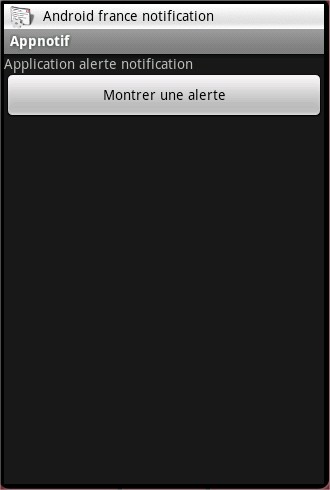
    D’abord Mon fichier xml de mon interface.

    ?Download download.txt
    1
    2
    3
    4
    5
    6
    7
    8
    9
    10
    11
    12
    13
    14
    15
    16
    17
    
    <?xml version="1.0" encoding="utf-8"?>
    <LinearLayout xmlns:android="http://schemas.android.com/apk/res/android"
        android:orientation="vertical"
        android:layout_width="fill_parent"
        android:layout_height="fill_parent"
        >
    <TextView
        android:layout_width="fill_parent"
        android:layout_height="wrap_content"
        android:text="Application alerte notification"
        />
        <Button
         android:id="@+id/btn_showsample"
        android:layout_width="fill_parent"
        android:layout_height="wrap_content"
        android:text="Montrer une alert." />
    </LinearLayout>

    Je crée deux objets de type NotificationManager(objet gérant les notifications) et Notification(objet de la notification)

    ?Download download.txt
    1
    2
    
     private NotificationManager mNotificationManager;
     Notification notification;

    Ensuite j’instancie ces objets et avec la méthode setOnClickListener de mon bouton je lance une notification.

    ?Download download.txt
    1
    2
    3
    4
    5
    6
    7
    8
    9
    10
    11
    12
    13
    14
    15
    16
    17
    18
    19
    20
    21
    22
    23
    24
    25
    
      super.onCreate(savedInstanceState);
            setContentView(R.layout.main);
            //icone qui s'affichera dans la bar de notification
            int icon = R.drawable.icon;
           //texte dans la bar de notification
            CharSequence tickerText = "Notification android-france";
            long when = System.currentTimeMillis();
     
            notification = new Notification(icon, tickerText, when);
     
            Context context = getApplicationContext();
            CharSequence contentTitle = "Notification Android-france";
            CharSequence contentText = "Tuto Bar de notification";
            Intent notificationIntent = new Intent(this, Appnotif.class);
            PendingIntent contentIntent = PendingIntent.getActivity(this, 0, notificationIntent, 0);
            notification.setLatestEventInfo(context, contentTitle, contentText, contentIntent);
     
            mNotificationManager = (NotificationManager) getSystemService(NOTIFICATION_SERVICE);
     
            Button btsauvegarde = (Button) findViewById(R.id.btn_showsample);
            btsauvegarde.setOnClickListener(new Button.OnClickListener() {
                public void onClick(View v) {
                	mNotificationManager.notify(1,notification);
                }
            });

    Résutat
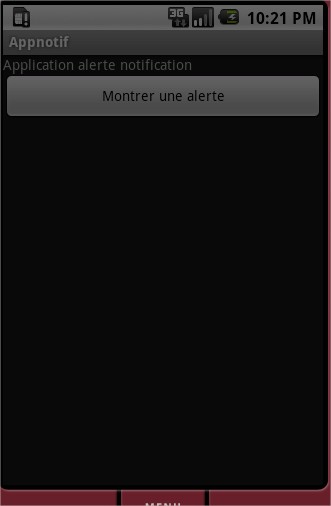
    notif1 196x300 Utiliser la bar de notification dans vos applications android Android France notif3 202x300 Utiliser la bar de notification dans vos applications android Android Francenotif2 205x300 Utiliser la bar de notification dans vos applications android Android France


    Apprenez à développer en vidéo

    Guy

    Co-fondateur du site Android france, senior lead developper, passionné de bière et de cigare cubain

    Twitter Google+ 

Un commentaire

Laissez un commentaire

     Vous devez être identifié pour publier un commentaire.
     Connexion - Inscription